Segmance
This project’s post is currently being updated. Everything below consists of quick drafts of text filled with typos and ideas. This message will disappear once this post will be complete.
Why?
In Japan, I was given precious opportunities to perform in festivals and community events in the town I was living in.1. Generally, to create a performance routine, I split the audio of my target song into parts and write notes on what moves I want to execute inside them. Being the developer I am, my desire was to create a tool tailored for combining audio and notes to practice and structure performances easily. Granted, the creative process is different for everyone. Some people take long videos to extract footage they’ll use, and others jot down notes in a notebook. Shaped by my own experience, my motivation with Segmance 2. was to provide a structured way for performers to streamline performance creation, or atleast lay the initial building blocks.
Overview
What?
Not suprisingly, breaking things down into smaller parts is a fundamental way to start anything. For example, when learning a piece on an instrument, you practice measure by measure to play longer sections and eventually its entirety. In juggling, you break complex patterns into manageable ones.
Following that principle, I wanted users to be able to practice performances in parts. Every part would have its associated audio, reference video and moves. The moves are an abstract unit of action. For a ballet dancer, the move could be pirouette, for a breakdancer a freeze
| Part | Moves |
|---|---|
| Part 1 | A,B,C |
| Part 2 | D,E,F |
| Part 3 | G,H,I |
Creating a Routine
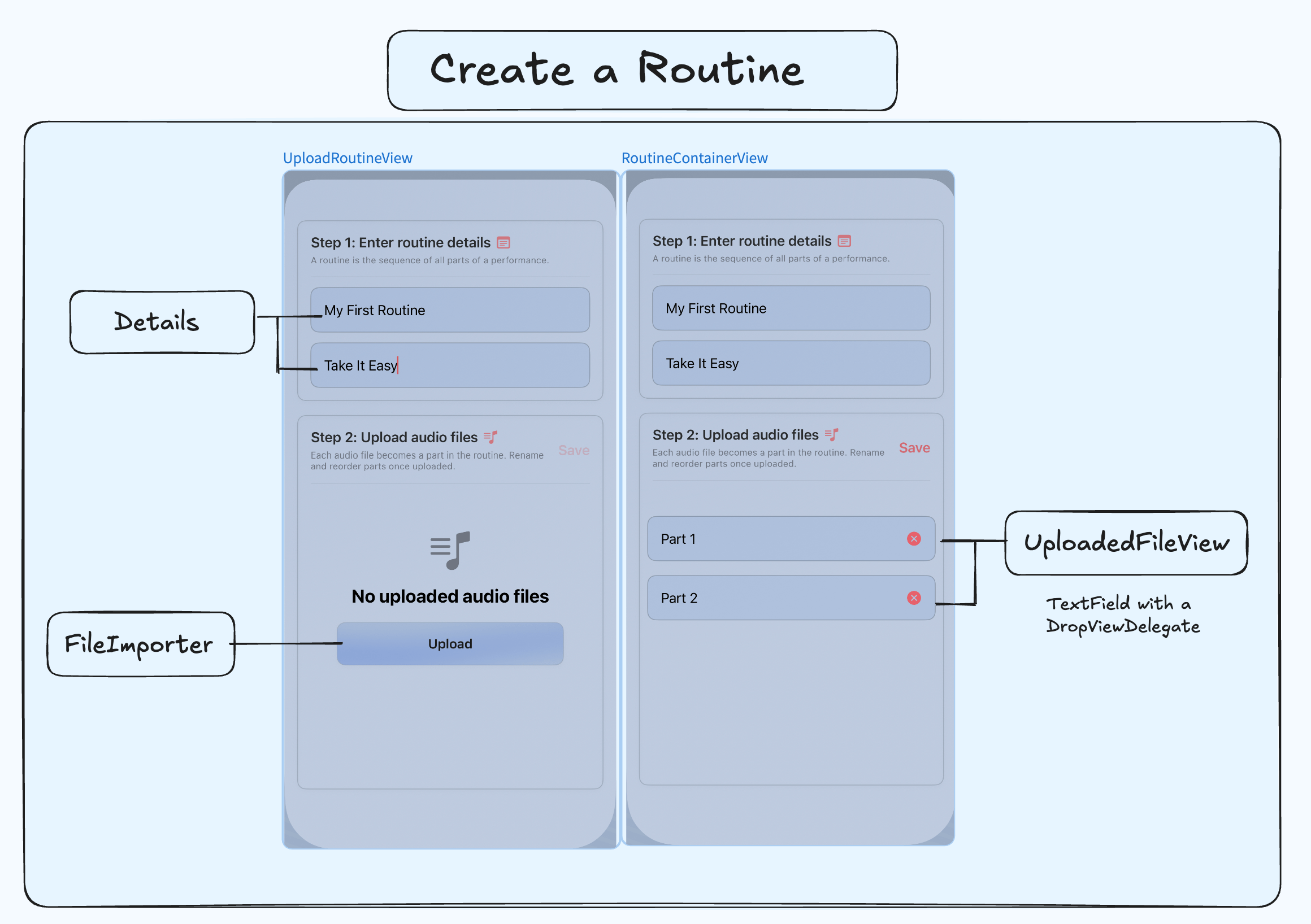
Users create routines by uploading audio files of a song. Every audio file is converted to a part inside a routine. These parts can be renamed and reordered before finalizing its creation. They can create clips through the integrated clipper/trimmer or through their preferred software.
Once a user has all parts of a song they want to practice, they can proceed to create a routine. The files are then copied to the app’s sandbox and transformed into Part models inside a routine. Each part has a fileName property used inside a computed property, location, that fetches the uploaded file. Upon creation, every audio file in the routine becomes a linked part (PartView)
// Part.swift
class Part {
 // Other properties...
 var fileName: String
 var location: URL? {

        let fileManager = FileManager.default
        guard let documentsDirectory = fileManager.urls(for: .documentDirectory, in: .userDomainMask).first else {
            return nil
        }
        return documentsDirectory.appendingPathComponent(fileName)

    }
}
Inside a Routine
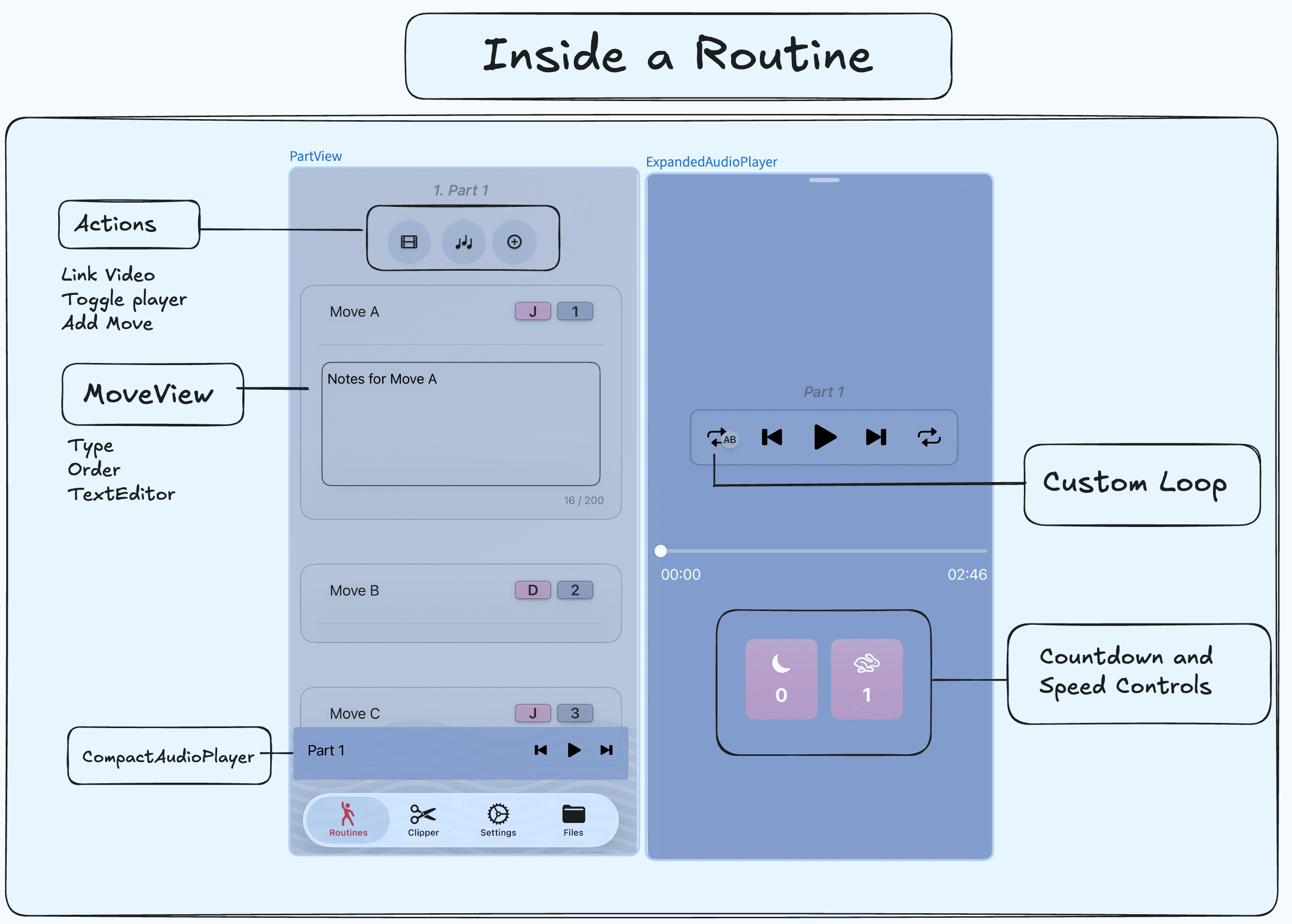
Upon creation, every audio file in the routine becomes a linked part (PartView) in which users can:
- add, reorder and delete moves of types they specify.
- Toggle and control the audio specific to that part.
- Link a video from their photos library for reference.
Models
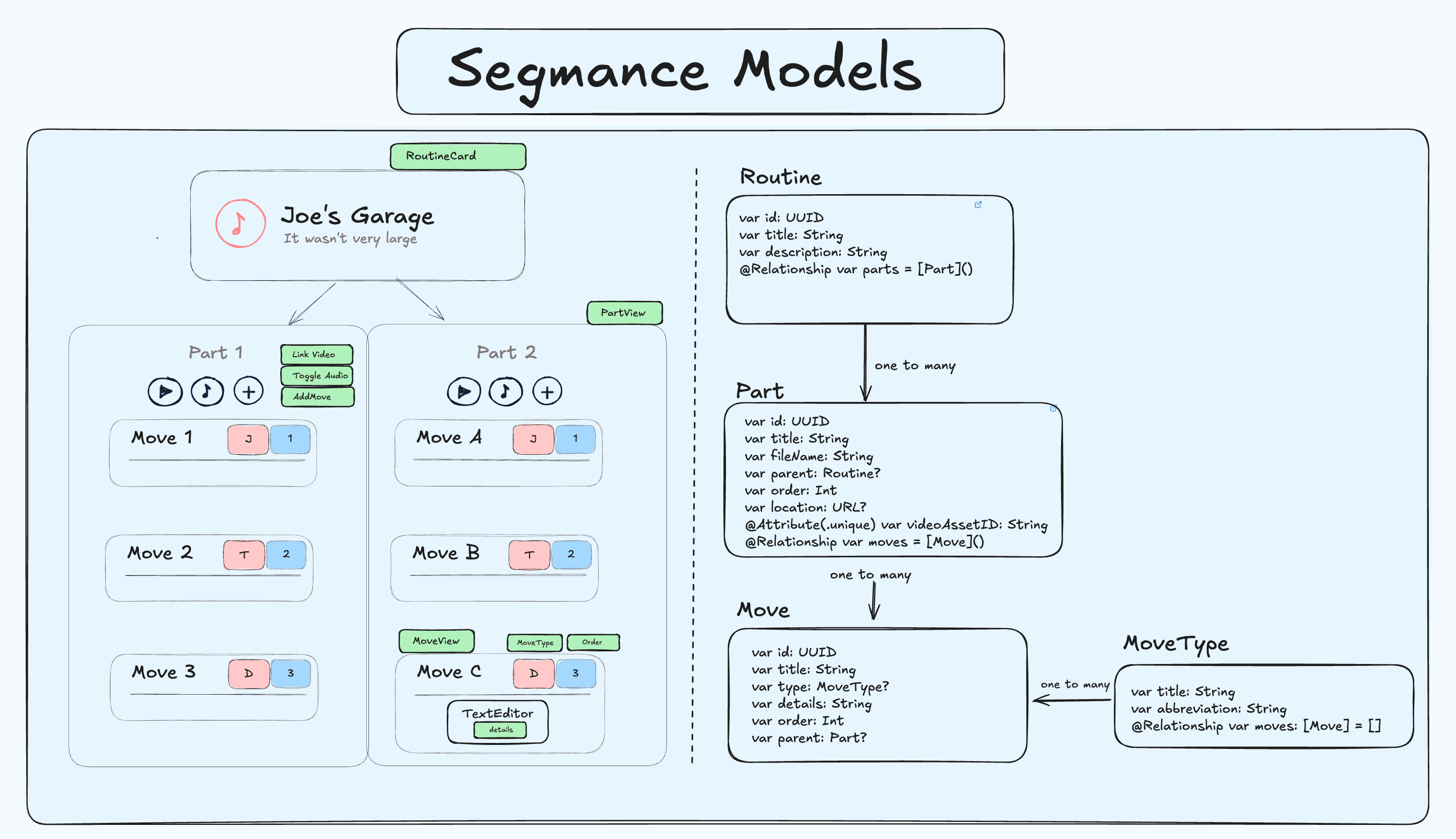
These are my models for reference. I used SwiftData for this project and my last one. I’ll give GRDB a spin for my next iOS project, because I’ve grown to dislike handling relationships with SwiftData.
Playing with AVAudioPlayer
Controls
Here are the controls I implemented for the AudioPlayer.
- play/plause
- seek forwards and backwards
- loop
- custom loop: displaying markers above the player (*)
- countdown with a timer (*)
Edge Cases
- Changing the play/pause images when audio finishes
- Turning off the loop if custom loop is on
- Restarting the timer with the countdown if the audio section ends.
- Seeking past custom loop markers
- Preventing the creation of multiple countdown timers
And more…
Cancelling tasks
Inside the audio player, I’ve integrated a countdown timer and a custom loop feature. If users have bigger audio files they want to loop through, they can set a custom loop between two marks. The countdown resets every time passes the second mark. However, if the user willing drags the audio past the second mark multiple times, we have to make sure to cancel the loop tasks because otherwise, a stack of delay tasks would happen.
let task = DispatchWorkItem { [weak self] in
        self?.audioPlayer?.play()
    }
loopPlayTask = task
DispatchQueue.main.asyncAfter(deadline: .now() + TimeInterval(delay), execute: task)
return
AudioPlayerModel
Every part comes
//PartView
if let partURL = part.location {
        AudioPlayerView(audioFileURL: partURL, partTitle: part.title)
    }
Expanding the player
I followed Kavsoft’s tutorial to implement this
Clipping Tracks
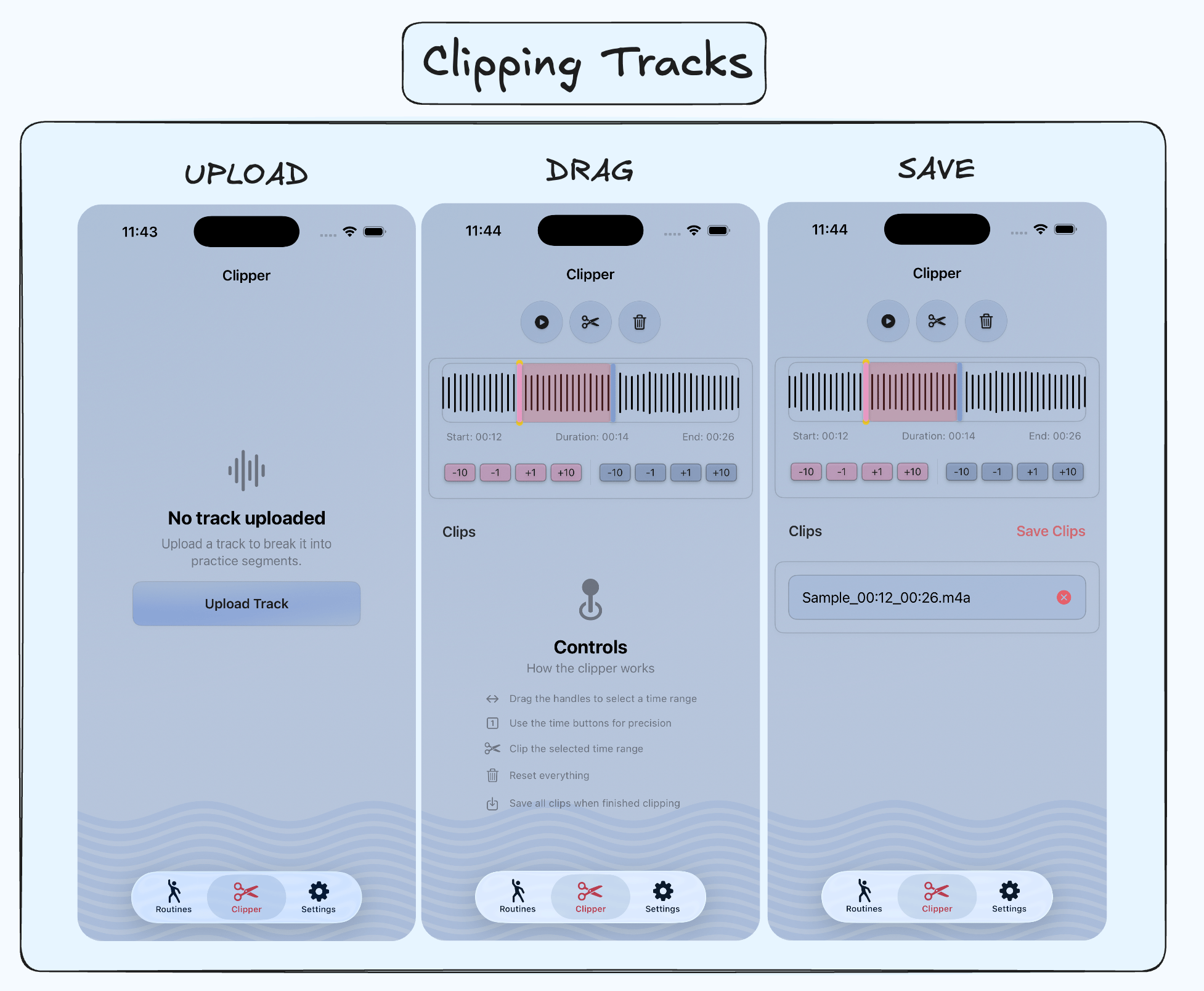
The audio waves are generated by using DSWaveformImage by Dennis Schmidt.
Edge cases:
- Preventing the start and end handles from going past each other
- Clipping already existing parts
- Disabling buttons during clipping.
Challenges
This project pushed me to deepen my understanding of some of the more advanced Swift mechanics notably concurrency and AVAudioPlayer. I’m putting them in bullet points here, but I took quite a few bullets mentally from their implementations.
Programming
- How to link audio files to each part.
- How to reorder parts and update their order with DropDelegate
- Creating an expandable audio player and audio clipper (AudioPlayerModel and AudioClipperModel)
- Creating a floating video player across parts (VideoPlayerModel)
- Utilizing concurrency to manage custom loops, countdown timers, audio trimming.
UI/UX
- Make reordering moves with drag and drop smooth.
- Where to add context menus for deletion, where should the user be able to delete?
- Where to put audio controls
- Making empty state views more explicit robust
- using TipKit to notify the user of any subtle functionality
Footnotes
-
For reference, I juggle and dance to tunes I learn. For example, what I like to do is learn a song on piano and then build a dance/juggling choreography with it.
-
Segmance is a portmanteau of Segment and Performance. It was named ChoreoBuilder before, but I didn’t want people to strictly associate the app with dance. I’ve cycled through names like StageNote, SegForm, CueNote, but most were already taken or didn’t capture the app’s essence.